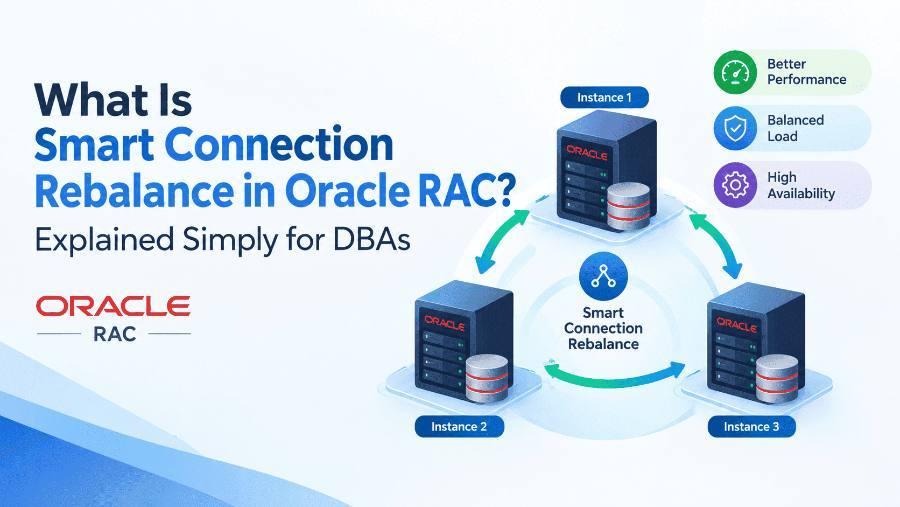
Smart Connection Rebalance is an Oracle RAC feature that automatically moves database sessions to the instance where their data already lives, so the cluster stops wasting time shipping blocks between nodes. It arrived with Oracle Database 23ai and continues in Oracle AI Database 26ai.
In this guide, you will learn:
- Why evenly balanced RAC sessions can still perform badly
- What Smart Connection Rebalance is, in plain words
- How it works, step by step
- How to tell if your service would benefit
- Prerequisites, best practices and a comparison with older load balancing methods
- Interview questions on the feature
Your application connects through a service that runs on all instances. The listener spreads connections evenly, which looks perfectly balanced on a dashboard.
But balance by count is not balance by work. If sessions on instance 1 and instance 2 keep updating the same rows, every block has to travel across the interconnect through Cache Fusion. You see it in AWR as gc buffer busy, gc current block busy and other global cache waits.
For years the fix was manual: split the application into separate services, pin each to one instance, and hope the workload never changes. Smart Connection Rebalance does that thinking for you, continuously.
Smart Connection Rebalance watches how sessions access data across your RAC instances. When it finds sessions on different instances fighting over the same blocks, it quietly relocates them so that sessions with similar access patterns end up on the same instance.
Oracle describes it as transparently reshuffling service-based connections using real-time performance monitoring, with no manual intervention needed. The result is fewer blocks crossing the interconnect, lower global cache waits and better throughput for high-contention workloads.
Three words sum it up:
- Smart — it decides based on actual data access, not just connection counts or CPU load.
- Connection — it works at the level of service-based sessions and connections.
- Rebalance — it moves existing sessions, not only new ones, so the cluster keeps adjusting as the workload changes.
Imagine an office with two rooms and one shared filing cabinet. The accounts team is split across both rooms, so people keep running down the corridor to borrow the same files from each other. Everyone has a desk, the rooms look evenly staffed, yet work is slow because of all the back-and-forth.
A smart office manager notices the pattern and simply seats the whole accounts team in one room. The files stay in one place, nobody runs down the corridor, and work speeds up.
At a high level, the feature runs a continuous observe-decide-move loop:
- Observe. The database monitors, in real time, which sessions on which instances are touching which data, and how much global cache traffic that causes.
- Find affinity. It identifies groups of sessions with similar access patterns that are currently spread across instances and generating contention.
- Decide. It evaluates whether moving those sessions to a common instance would reduce cross-instance block transfers enough to be worth it.
- Move. It relocates the sessions to the chosen instance, using RAC's connection draining and high availability machinery so the application does not see errors.
- Repeat. As the workload shifts during the day, the loop keeps re-evaluating and rebalancing.
The key point for DBAs: this is not a one-time placement decision made at login. It is ongoing, and it is driven by data access rather than session count.
Take a two-node RAC database running two applications through one service, APP_SVC, available on both instances. ORDERS sessions work on order tables; BILLING sessions work on invoice tables. The listener spreads both evenly.
You do not have to guess. Oracle gives you two built-in signals.
1. The AWR Report
Oracle's MAA team notes that AWR includes a Smart Connection Rebalance recommendation engine section, which points out workloads that would benefit from the feature. Start here when you see heavy global cache waits.
2. V$ACTIVE_SERVICES
In the 26ai reference, this view has a column that reports, per service, whether enabling Smart Connection Rebalance is recommended. A value of YES means Oracle recommends enabling it; ENABLED means it is already on.
-- Review your active services and their settings
SELECT *
FROM   v$active_services
ORDER  BY name;
Good candidates usually show:
- High
gcwait events in the AWR Top 10 foreground events - One service spread across several instances
- Many sessions repeatedly modifying the same tables or index blocks
Smart Connection Rebalance builds on RAC features you may already use. The smoother your high availability setup, the more transparent the session moves will be.
- Connect through services, not instance names — the feature reshuffles service-based connections, so applications must use a RAC service.
- Use Oracle connection pools where possible — UCP for Java, ODP.NET or OCI session pools understand FAN events and handle drained connections cleanly.
- Enable FAN — Fast Application Notification lets clients learn quickly that a connection should move.
- Consider Application Continuity or Transparent Application Continuity — these help in-flight work survive a move without the user seeing an error.
- Return connections to the pool after each request — applications that hold one connection for hours are harder to move gracefully.
- Measure before and after — compare AWR global cache waits and response times to confirm the benefit in your environment.
- Test first — validate in a non-production cluster with a realistic workload before enabling it in production.
RAC has always had load balancing. The difference is what each method balances on and when it acts.
The older methods spread work evenly. Smart Connection Rebalance places work intelligently, which matters more when contention, not capacity, is the bottleneck. They are complementary: you still want good service design and RLB.
Q1. What problem does Smart Connection Rebalance solve?
It reduces Cache Fusion overhead caused by sessions on different instances contending for the same data blocks, by relocating those sessions to a common instance.
Q2. In which release was it introduced?
Oracle Database 23ai, and it continues in Oracle AI Database 26ai.
Q3. How is it different from Runtime Connection Load Balancing?
RLB steers new requests to the instance with the best service quality. Smart Connection Rebalance looks at data access affinity and moves existing sessions to cut cross-instance block transfers.
Q4. Which wait events suggest a workload would benefit?
High global cache waits such as gc buffer busy acquire/release and gc current block busy in AWR.
Q5. How can a DBA check if Oracle recommends enabling it?
Look at the Smart Connection Rebalance recommendation section in AWR, and the recommendation column in V$ACTIVE_SERVICES (YES means recommended, ENABLED means on).
Q6. Does the application need code changes?
No code changes are required for the feature itself, but applications should connect through services and ideally use Oracle pools, FAN and Application Continuity so moves are seamless.
Q7. When would it not help much?
When there is little cross-instance contention, for example when services are already well partitioned or the workload is mostly read-only on separate data.
Smart Connection Rebalance changes the question RAC asks from “which instance has room?” to “which instance already has this data?” By keeping sessions that share data on the same node, it attacks global cache contention at its source, without the DBA redesigning services by hand.
If your AWR reports are full of gc waits, check the AWR recommendation section and V$ACTIVE_SERVICES first. If Oracle says YES, test it in a lower environment, measure the difference, and let the database do the rebalancing for you.
Recap: what to take away
- Smart Connection Rebalance moves sessions with similar data access to the same RAC instance
- It cuts Cache Fusion traffic and global cache waits without manual service partitioning
- It was introduced in 23ai and continues in 26ai
- Check the AWR recommendation section and V$ACTIVE_SERVICES to see if a service would benefit
- Use services, Oracle pools, FAN and Application Continuity for seamless session moves
Want more hands-on guides? KP Expert publishes practical, step-by-step guides for infrastructure and certification professionals. Explore KP Expert.