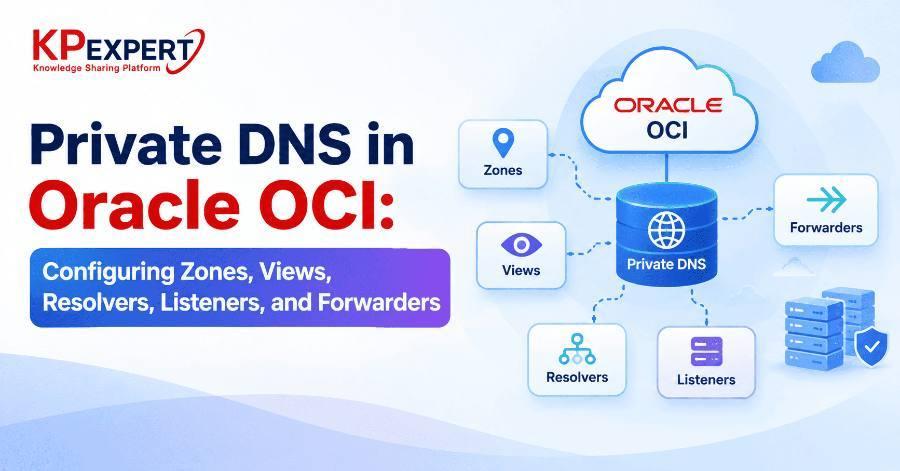
How OCI's five Private DNS building blocks fit together, and how to configure cross-VCN and hybrid on-premises resolution without breaking the resolution order.
Most engineers' first encounter with OCI's Private DNS service is a single private zone attached to a single VCN — and at that scale, it's genuinely simple. The complexity shows up the moment a second VCN, an on-premises network, or a peered environment needs to resolve names that live in OCI, or vice versa. At that point you're no longer configuring “DNS for a VCN” — you're designing a resolution topology across zones, views, resolvers, listeners, and forwarders, and getting the order of precedence wrong is the single biggest source of “it resolves from here but not from there” bugs.
This post walks through what each of these five components actually does, how they fit together, and how to configure cross-VCN and hybrid DNS resolution correctly.
Before touching the console or CLI, it's worth being precise about what each term means in Oracle OCI, because they map to genuinely different objects, not synonyms for the same thing:
Start with the zone itself:
oci dns zone create \
  --compartment-id "ocid1.compartment.oc1...." \
  --name "internal.example.com" \
  --zone-type PRIMARY \
  --scope PRIVATE \
  --view-id "ocid1.dnsview.oc1...."
Every private zone must belong to a private view — there's no such thing as an unscoped private zone. Add an A record for a resource inside that zone:
oci dns record rrset update \
  --zone-name-or-id "internal.example.com" \
  --domain "app.internal.example.com" \
  --rtype "A" \
  --items '[{"domain":"app.internal.example.com","rtype":"A","rdata":"10.0.1.15","ttl":300}]' \
  --scope PRIVATE \
--view-id "ocid1.dnsview.oc1...."If you didn't create the view up front, do it now:
oci dns view create \
  --compartment-id "ocid1.compartment.oc1...." \
  --display-name "internal-view" \
  --scope PRIVATE
Attach the view to the VCN's default resolver so instances inside that VCN can resolve the zone:
oci dns resolver update \
  --resolver-id "ocid1.dnsresolver.oc1...." \
--attached-views '[{"viewId":"ocid1.dnsview.oc1...."}]'app.internal.example.com — but a second VCN still has no visibility into this zone at all.There are two ways to let a second VCN resolve names from the first VCN's zone, and the choice matters for how the rest of your topology scales.
Option A — Attach the Same View Directly
The simplest approach for a small number of VCNs:
oci dns resolver update \
  --resolver-id "ocid1.dnsresolver.oc1.vcnb...." \
  --attached-views '[{"viewId":"ocid1.dnsview.oc1...."}]'
This works well for a handful of VCNs but becomes unwieldy as the environment grows — every new VCN needs every relevant view attached, and every new view needs attaching to every VCN that should see it.
Option B — Deploy Listeners and Forwarders
Resolvers query each other over the network rather than sharing view attachments directly. This is the approach that scales to hub-and-spoke topologies and hybrid on-premises resolution, covered next.
A listener is a resolver endpoint that accepts inbound queries. Create one in a subnet of the VCN that owns the zone you want to expose:
oci dns resolver-endpoint create \
  --resolver-id "ocid1.dnsresolver.oc1...." \
  --name "lsn-vcn-a" \
  --endpoint-type VNIC \
  --is-forwarding false \
  --is-listening true \
  --subnet-id "ocid1.subnet.oc1...." \
  --listening-address "10.0.1.6"
On the other VCN — the one that needs to resolve names owned by the first VCN — deploy a forwarder:
oci dns resolver-endpoint create \
  --resolver-id "ocid1.dnsresolver.oc1.vcnb...." \
  --name "fwd-vcn-b" \
  --endpoint-type VNIC \
  --is-forwarding true \
  --is-listening false \
  --subnet-id "ocid1.subnet.oc1.vcnb...." \
  --forwarding-address "10.1.1.6"
Then add a rule on the second VCN's resolver telling it to forward queries for that specific domain to the first VCN's listener IP:
oci dns resolver update \
  --resolver-id "ocid1.dnsresolver.oc1.vcnb...." \
  --rules '[
    {
      "action": "FORWARD",
      "clientAddressConditions": [],
      "qnameCoverConditions": ["internal.example.com"],
      "destinationAddresses": ["10.0.1.6"],
      "forwardingEndpointId": "ocid1.dnsresolverendpoint.oc1.vcnb...."
    }
  ]'
This rule means: any query for a name under internal.example.com gets forwarded to 10.0.1.6 — the listener on the other VCN — instead of being answered locally or sent to the internet.
For environments with more than a couple of VCNs, attaching every view to every resolver directly becomes unmanageable. The pattern that scales is designating one VCN as a DNS hub:
- The hub VCN's resolver has every relevant private view attached — giving it visibility into every private zone in the region.
- The hub VCN runs both a listener (so spoke VCNs and on-premises networks can query it) and a forwarder (so it can reach external DNS for anything it doesn't own, such as an on-premises domain).
- Every spoke VCN runs only a forwarder, with a catch-all or domain-specific rule pointing at the hub's listener.
This collapses what would otherwise be N×N view attachments into a single hub resolver holding all the views, with spokes doing a single forwarding hop. It also gives you one place to configure conditional forwarding rules for on-premises domains, rather than repeating that configuration on every VCN.
--scope PRIVATEPrivate DNS design in OCI mirrors the same hub-and-spoke thinking that governs routing and security architecture at scale: a small number of VCNs can get away with direct view attachment, but any environment expecting to grow — multiple business units, hybrid on-premises connectivity, or multi-VCN landing zones — benefits from designing the listener/forwarder/hub topology early, rather than retrofitting it once dozens of point-to-point view attachments have already accumulated.
Recap: what to take away
- Zones hold records, views group zones and attach to resolvers, and resolvers answer using attached views, then rules, then the internet.
- Listeners accept inbound queries; forwarders send outbound queries — together they let resolvers in different VCNs talk to each other.
- Direct view attachment works for a few VCNs; listener/forwarder topologies scale better as the environment grows.
- A hub VCN with all views attached, running both a listener and forwarder, collapses N×N view sprawl into a single forwarding hop for spokes.