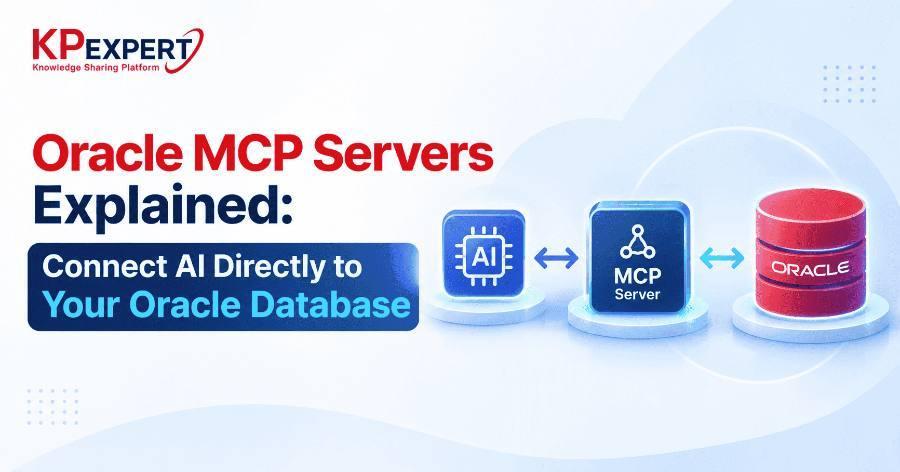
Oracle MCP Servers Explained: Connect AI Directly to Your Oracle Database
Enterprise AI adoption keeps running into the same wall: large language models are excellent reasoners but have no native way to talk to the systems where enterprise data actually lives. Oracle Database, still the backbone of transaction processing for a huge share of global enterprises, has historically required custom middleware, REST wrappers, or brittle prompt-engineering hacks to expose its data to an AI model. The Model Context Protocol (MCP) changes that equation, and Oracle's growing support for MCP servers gives developers a standardized, secure way to let AI models query, reason over, and act on Oracle data directly.
This post breaks down what MCP is, how an Oracle MCP server works under the hood, and how to actually connect one to your Oracle database.
MCP (Model Context Protocol) is an open protocol, originally introduced by Anthropic, that standardizes how AI applications connect to external tools, data sources, and systems. Think of it as analogous to what LSP (Language Server Protocol) did for code editors and language tooling — instead of every editor building custom integrations for every language, LSP created one interface both sides could implement against. MCP does the same thing for AI models and external systems.
Architecturally, MCP follows a client-host-server model:
Communication happens over JSON-RPC 2.0, typically transported via stdio for local servers or HTTP with Server-Sent Events / Streamable HTTP for remote servers. The protocol defines three primary primitives: tools (executable functions the model can invoke, like run_sql_query), resources (structured data the host can read into context, like a schema definition), and prompts (reusable templates the server exposes for common workflows).
Oracle Database environments tend to be more complex than a typical Postgres or MySQL deployment: PL/SQL stored procedures encode business logic, data is often partitioned across schemas with fine-grained privilege models, and query plans matter enormously at scale. A generic database connector that just runs arbitrary SQL against Oracle misses most of this nuance and — worse — creates a serious security exposure if the AI model has unconstrained write access.
A typical Oracle MCP server implementation is built on Oracle's python-oracledb or node-oracledb driver, wrapped in an MCP server SDK. Here's what the architecture looks like at each layer.
1. Connection Layer
Manages a connection pool to the Oracle instance using oracledb.create_pool(), with credentials pulled from environment variables or a secrets manager rather than hardcoded into the server. Oracle Wallet or TLS-based mutual authentication is standard for anything beyond local dev.
2. Tool Definitions
Each exposed capability is registered as an MCP tool with a JSON Schema defining its inputs:
@server.tool()
async def query_sales_by_region(region: str, quarter: str) -> dict:
    """Query aggregated sales figures for a given region and quarter."""
    async with pool.acquire() as conn:
        cursor = conn.cursor()
        cursor.execute(
            "SELECT region, quarter, SUM(amount) FROM sales "
            "WHERE region = :region AND quarter = :quarter "
            "GROUP BY region, quarter",
            region=region, quarter=quarter
        )
return cursor.fetchall():region, :quarter) rather than string interpolation isn't optional. An MCP server that constructs SQL by concatenating a model's free-text output is a SQL injection vector waiting to be triggered — whether by an adversarial prompt or simply model error.3. Schema Introspection Resources
Rather than dumping an entire data dictionary into the model's context window, well-designed Oracle MCP servers expose schema information as on-demand resources — table structures, column types, foreign key relationships — pulled from ALL_TAB_COLUMNS, ALL_CONSTRAINTS, and similar data dictionary views. The model requests only the schema slice relevant to the current task.
4. Vector Search Integration
With Oracle 23ai's native VECTOR data type, an MCP server can expose semantic search as a first-class tool, letting the model run similarity queries using VECTOR_DISTANCE() against embedded document chunks stored directly in Oracle tables — no separate vector database required.
5. Access Control Layer
This is the piece most implementations underinvest in. The MCP server should enforce role-based restrictions independent of what the underlying Oracle user can technically do — read-only tool sets for exploratory queries, an explicit allowlist of invokable stored procedures, and query result row limits to prevent unbounded data exfiltration through the model.
Provisioning follows a fairly consistent path regardless of which MCP server implementation you use:
SELECT on specific views/tables and EXECUTE on approved packages. Never point an MCP server at a DBA-level account.execute_sql tool.A few failure modes show up repeatedly in early Oracle MCP deployments:
Oracle's own direction with 23ai — native vector search, JSON collections, and graph capabilities inside the same converged database — pairs naturally with MCP's tool-based model. Instead of AI applications needing separate integrations for relational queries, vector similarity search, and graph traversal, a single Oracle MCP server can expose all three as tools against one underlying system. For teams building AI features on top of existing Oracle infrastructure, this is a meaningfully lower-friction path than the ETL-to-vector-database pipelines that dominated the last generation of RAG architectures.
The protocol is young, and tooling maturity varies across implementations, but the direction is clear: MCP is becoming the standard interface layer between AI models and enterprise data systems, and Oracle's database capabilities make it one of the more compelling backends to expose through it.
Recap: what to take away
- MCP standardizes how AI applications connect to external tools and data — the same role LSP played for editors and languages.
- An Oracle MCP server is a controlled intermediary, not a direct database connection: it exposes curated tools instead of raw SQL access.
- Bind variables, minimally privileged accounts, and result-size limits are non-negotiable — not optional hardening.
- Oracle 23ai's native vector type lets a single MCP server expose relational, vector, and (soon) graph queries through one consistent interface.