What Is Exadata Extended (XT) Storage? Explained Simply for DBAs
- Exadata Extended (XT) storage is a lower-cost Exadata storage server for data you must keep online but rarely touch: history, archives, documents, compliance data, local backups and dev/test databases.
- XT first appeared with Exadata X8 in 2019. The X11M XT (September 2025) is a big redesign: it is the first XT with flash cache and the first to support both ASM and Exascale.
- Exadata System Software licenses are optional on X11M XT. Oracle says this lets you build XT storage at a list price 76% lower than standard HC storage servers.
- Smart Scan and Storage Indexes need those software licenses; once licensed, you switch them on with one CellCLI command.
- XT storage cannot be mixed into existing EF or HC disk groups or pools. You create a separate XTND disk group or XT storage pool and move cold data there.
Every production Oracle Exadata database grows a long tail of data that nobody queries often: last decade's orders, closed insurance claims, scanned contracts, audit trails kept for regulators. The business still needs it online, because someone will run a report on it or an auditor will ask for it, so you cannot simply archive it to tape.
On Exadata, that creates an uncomfortable trade-off. High Capacity (HC) and Extreme Flash (EF) storage servers are built and licensed for performance. Keeping terabytes of rarely used data on them means paying premium hardware and software costs for data that mostly sits still.
Oracle's answer is the Exadata Extended (XT) Storage Server: Exadata storage that stays inside the same rack, the same network fabric and the same database, but is designed and priced for data that is accessed less often.
This guide explains what XT storage is, what changed in the X11M generation, how it compares with other Exadata storage servers, how licensing works, how DBAs actually use it, and the mistakes to avoid. Every technical claim links to Oracle documentation or Oracle's own product blogs in the Sources section, so you can verify it for your release.
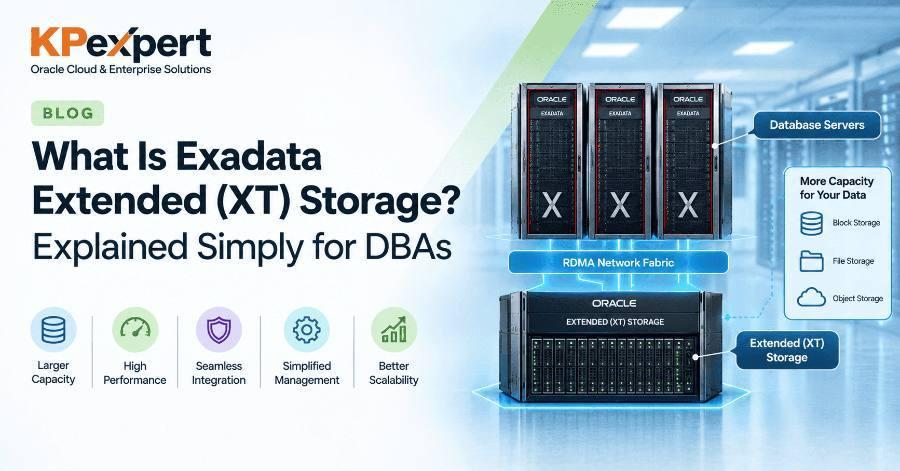
An Exadata Extended (XT) Storage Server is a capacity-focused Exadata storage server. Oracle's Maintenance Guide describes it as a lower-cost storage option for infrequently accessed, older or regulatory data, with each server holding twelve high-capacity disk drives and an overall hardware specification optimized to reduce cost.
The important word is Exadata. XT is not an external NAS or a separate archive appliance. It plugs into the same Exadata rack, uses the same RDMA Network Fabric as the other servers, and is managed with the same tools. Oracle Database sees it as normal database storage, so features such as Oracle Partitioning and Advanced Compression work on it as usual.
A Short History: X8 to X11M
XT storage was introduced with Exadata X8 in 2019 and continued through X8M, X9M and X10M. Those earlier XT servers were essentially disk-only capacity servers: cheap, large and slower than HC.
The X11M XT, announced on 11 September 2025, was described by Oracle as “all-new”. It adds flash cache, Exascale support and a different licensing model, which changes when it makes sense to use XT.
A Simple Analogy
Think of a large supermarket. The shelves at the front hold fast-moving goods that customers grab every minute. That is your EF and HC storage: expensive floor space, built for speed.
Behind the shop is a stockroom. It is cheaper per square metre, holds far more, and staff only go there when something specific is needed. It is still inside the same building, so nothing has to be shipped in from another city.
According to Oracle's announcement and the Exadata storage server page, each X11M XT storage server contains:
Oracle quotes up to 600,000 OLTP read IOPS and 500,000 OLTP write IOPS per X11M XT server, thanks to the flash cache, and up to 50 GB/s SQL scan throughput when Smart Scan is licensed and enabled.
The flash cards in XT are the same 6.8 TB performance-optimized cards used in EF, HC and HC-Z servers, so cache behaviour is familiar to anyone who already runs Exadata.
If you worked with X8M, X9M or X10M XT servers, forget some of what you know. The X11M XT behaves quite differently.
The three changes that matter most:
1. Flash Cache Makes XT Usable for More Than Archives
Older XT servers read everything from spinning disk, so they were really only suitable for data that was almost never queried. With flash cache, hot blocks on XT are served from flash, which is why Oracle now positions X11M XT for dev/test databases as well as archives.
2. Exascale Support
Exascale is Oracle's newer Exadata storage architecture that decouples storage management from database servers and provides pooled storage and space-efficient thin clones. X11M XT can form an XT storage pool that many database clusters share. Earlier XT models cannot be used with Exascale.
3. Hybrid Deployments
Using Oracle Exadata Deployment Assistant (OEDA), you can run Exascale and ASM on the same X11M XT servers, which helps when you are migrating gradually from ASM to Exascale.
The Exadata X11M family offers four kinds of storage server. They share the same scale-out architecture but are built for different jobs.
A simple way to decide:
- Latency-critical OLTP → EF.
- Mixed production workloads → HC.
- A smaller production system or a first Exadata → HC-Z.
- Large volumes of data that must stay online but are rarely used → XT, alongside one of the above.
Licensing is where XT differs most from other Exadata storage, and it is the part DBAs most often get wrong.
EF, HC and HC-Z storage servers require Oracle Exadata System Software licenses. On X11M XT, those licenses are optional. Oracle says buying XT without them gives you an XT storage pool or XTND disk group at a list price 76% lower than standard HC storage servers.
Without Exadata System Software Licenses
- Data is stored and served normally through ASM or Exascale.
- Exadata Smart Flash Cache caches hot data in flash.
- Hybrid Columnar Compression (HCC) is included with X11M XT, as in earlier generations.
- Smart Scan and Storage Indexes stay disabled, so queries return full blocks to the database servers instead of filtered rows.
With Exadata System Software Licenses
If your XT data gets queried more than expected, for example by analytics or month-end reports, you can license the software and switch on Smart Scan and Storage Indexes. Oracle's Maintenance Guide gives this procedure:
- Procure or transfer Oracle Exadata System Software licenses. All drives must be licensed to enable Smart Scan.
- Set the
enableSmartStorageattribute on each licensed XT storage server. You do not need to stop the storage servers first. - Verify the change.
# Run on each licensed XT storage server
cellcli -e ALTER CELL enableSmartStorage=true

# Verify
cellcli -e "LIST CELL ATTRIBUTES name, status, enableSmartStorage"
enableSmartStorage=true on XT servers that are not licensed. Licensing rules and prices change, so confirm the details with the Oracle Exadata Licensing Information guide and your Oracle account team before you buy or enable anything.XT servers sit in the same rack and on the same network fabric as your other storage servers, but their capacity is kept in its own disk group or storage pool. The database servers see one database; you decide which tablespaces or partitions live on which tier.
With ASM: The XTND Disk Group
After you add XT storage servers, you create new ASM disk groups on them. Oracle's default name for an XT disk group is XTND, though you can choose another name. You then create tablespaces on that disk group and place cold data there.
With Exascale: An XT Storage Pool
Starting with X11M XT, you can build an Exascale storage pool from XT servers, alongside existing EF or HC pools. Many database clusters can share that XT pool, and Exascale features such as thin clones work on it. Earlier XT models are not permitted with Exascale.
Deployment Rules Every DBA Should Know
- Minimum two servers, three for high redundancy — the initial deployment needs at least two XT storage servers; high redundancy needs at least three. You can add more later.
- No mixing server types — an ASM disk group or Exascale storage pool generally must not combine storage from different server types, so you cannot add XT disks to an existing DATA disk group built on HC.
- Same placement rules — XT servers follow the same rack placement patterns as HC and EF servers.
- Use OEDA — Oracle Exadata Deployment Assistant can create an XT pool, extend or create XTND disk groups, and set up hybrid Exascale plus ASM on the same XT servers.
- Software version — X11M XT requires Exadata System Software 25ai, release 25.2.0 or later.
Oracle's Maintenance Guide lists the kinds of data XT is meant to hold:
- Historical data, such as old order or transaction partitions
- Images, BLOBs, contracts and other large table-based objects
- Compliance and regulatory data that must stay online for a set number of years
- Local backups
- Development and test databases with less demanding performance needs than production
These have one thing in common: they are large, they grow steadily, and most of them are read rarely.
Real-World Examples
- Banking — transaction history older than two years stays queryable for customer disputes, but moves off HC storage.
- Insurance — scanned claim documents stored as SecureFiles LOBs live on XT, while active claims stay on HC.
- Retail — a data warehouse keeps the last 13 months of sales on HC for daily reports and older years on XT for yearly trend analysis.
- Development — Exascale thin clones of production PDBs for developers sit in an XT pool instead of consuming premium storage.
When XT Is the Wrong Choice
- Latency-sensitive OLTP — flash cache helps, but disk-backed XT is not a replacement for EF or HC for busy production tables.
- Heavy analytics without licenses — without Exadata System Software licenses there is no Smart Scan, so large scans ship full blocks to the database servers. Either license XT or keep that data on HC.
- Data that is cold only on paper — if “archive” data is actually hit by daily batch jobs, measure first. Moving it to XT could slow those jobs.
XT works best with Oracle's Information Lifecycle Management (ILM) tools. Oracle highlights that XT works with Automatic Data Optimization (ADO), which can move data to lower-cost storage as it ages and apply heavier compression at the same time. Here is a typical pattern, assuming an ASM disk group named XTND already exists on the XT servers.
Step 1. Create a Tablespace on XT Storage
CREATE BIGFILE TABLESPACE xt_archive
  DATAFILE '+XTND' SIZE 1T
  AUTOEXTEND ON NEXT 64G;
Step 2. Move an Old Partition to XT and Compress It with HCC
ALTER TABLE sales
  MOVE PARTITION sales_2019
  TABLESPACE xt_archive
  COMPRESS FOR ARCHIVE HIGH
  UPDATE INDEXES ONLINE;
ONLINE keeps the partition available for DML during the move. COMPRESS FOR ARCHIVE HIGH gives the highest HCC compression, which suits rarely queried history and stretches XT capacity further.
Step 3. Automate Future Moves with ADO
-- Turn on Heat Map so the database tracks segment access
ALTER SYSTEM SET heat_map = ON SCOPE = BOTH;

-- Compress segments that have not been modified for 12 months
ALTER TABLE sales ILM ADD POLICY
  COLUMN STORE COMPRESS FOR ARCHIVE HIGH
  SEGMENT AFTER 12 MONTHS OF NO MODIFICATION;

-- Move segments to XT storage when the source tablespace fills up
ALTER TABLE sales ILM ADD POLICY
  TIER TO xt_archive;
A TIER TO policy is triggered by space pressure on the source tablespace, based on the ILM thresholds set with DBMS_ILM_ADMIN. If you need movement based on age instead, combine partition maintenance jobs with the compression policy above.
Step 4. Verify Where the Data Lives
SELECT partition_name, tablespace_name, compress_for
FROM   dba_tab_partitions
WHERE  table_owner = 'SALES_OWNER'
AND    table_name  = 'SALES'
ORDER  BY partition_position;
The application keeps querying the same SALES table. Nothing changes in the SQL; only the physical location and compression of old partitions change.
These commands help you confirm what you are working with. Run CellCLI on a storage server, or use dcli to run it across a group of cells.
Identify the Server Model and Smart Scan Status
cellcli -e "LIST CELL ATTRIBUTES name, makeModel, status, enableSmartStorage"

# Across all XT cells listed in a group file
dcli -g xt_cells -l root "cellcli -e LIST CELL ATTRIBUTES name, enableSmartStorage"
Check Disks and Flash
cellcli -e "LIST PHYSICALDISK ATTRIBUTES name, diskType, status"
cellcli -e "LIST FLASHCACHE DETAIL"
On X11M XT you should see hard disks plus flash disks backing the flash cache. On older XT models you will see hard disks only.
Check Which Disk Group the Grid Disks Belong To
cellcli -e "LIST GRIDDISK ATTRIBUTES name, asmDiskGroupName, status"
Check XTND Capacity from the Database Side
SELECT name, type, total_mb, free_mb, usable_file_mb
FROM   v$asm_diskgroup
WHERE  name = 'XTND';
USABLE_FILE_MB accounts for redundancy, so plan growth against that column rather than FREE_MB.Mistakes to Avoid
- Trying to add XT disks to an existing HC disk group — server types should not be mixed in one disk group or pool. Create a separate XTND disk group or XT pool.
- Deploying a single XT server — the minimum is two, and three for high redundancy.
- Assuming Smart Scan works on XT — it only works when every drive is licensed and
enableSmartStorageis set to true. - Moving “cold” data without measuring — check AWR, Heat Map or
DBA_HEAT_MAP_SEGMENTfirst. Data that looks old may still be read by nightly jobs. - Expecting Exascale on old XT — only X11M XT supports Exascale; X8M to X10M XT is ASM-only.
- Sizing on raw capacity — redundancy reduces usable space. Use OECA and
USABLE_FILE_MB.
Best Practices
- Design around partitions — range or interval partitioning by date makes it easy to move whole partitions to XT.
- Pair XT with HCC — archive-level compression multiplies effective capacity on data that rarely changes.
- Automate with ADO where licensed — policies remove the need for manual moves every month.
- Keep indexes in mind — use
UPDATE INDEXESduring partition moves, and decide whether old local index partitions should also live on XT. - Revisit licensing if usage grows — if XT data becomes popular for analytics, licensing Exadata System Software and enabling Smart Scan may cost less than moving data back to HC.
- Document your tiering policy — write down which data goes to XT and when, so auditors and new team members understand it.
Q1. What is an Exadata Extended (XT) Storage Server?
A lower-cost Exadata storage server for infrequently accessed, older or regulatory data. It sits in the same rack and on the same RDMA fabric as other Exadata storage, and is used through ASM or, on X11M, Exascale.
Q2. When was XT introduced, and what changed in X11M?
XT came with Exadata X8 in 2019. X11M XT added flash cache, Exascale support, hybrid ASM plus Exascale deployments, and the ability to expand older X8M to X10M XT capacity.
Q3. What is the default ASM disk group name for XT storage?
XTND, although you can choose a different name.
Q4. Can you add XT disks to an existing HC DATA disk group?
No. A disk group or storage pool generally must not combine storage from different server types. You create a separate disk group or pool.
Q5. How many XT servers do you need?
At least two for the initial deployment, and at least three for high redundancy.
Q6. Does Smart Scan work on XT?
Only when all drives are covered by Exadata System Software licenses and enableSmartStorage=true is set on each licensed cell.
Q7. Which XT generations support Exascale?
Only X11M XT and later. Earlier XT models are not permitted with Exascale.
Q8. Name typical data you would place on XT.
Historical partitions, LOBs such as images and contracts, compliance data, local backups and dev/test databases.
Q9. How would you move aging data to XT automatically?
Use partitioning plus Automatic Data Optimization policies (with Heat Map), for example a TIER TO policy to an XT tablespace and an HCC compression policy based on modification age.
Q10. What minimum Exadata System Software release does X11M XT need?
Exadata System Software 25ai, release 25.2.0 or later.
Is XT storage slower than HC storage?
Yes, for most workloads. XT has fewer flash cards, less memory and no XRMEM, and without licenses it has no Smart Scan. On X11M XT, flash cache narrows the gap for frequently read blocks.
Can I run a production database entirely on XT?
Oracle positions XT for less frequently accessed data and lower-performance databases, not as primary storage for busy production systems. Keep hot production data on EF, HC or HC-Z.
Does the application need changes to use XT?
No. Data on XT stays in the same database and is queried with the same SQL. Only the tablespace or partition location changes.
Can I use Hybrid Columnar Compression on XT?
Yes. Oracle states HCC is included with X11M XT, as in earlier generations.
Can I mix X11M XT with my older X9M XT servers?
Oracle states X11M XT can expand the capacity of X8M, X9M or X10M XT storage. Check the current documentation for rules on mixing generations within a disk group.
Is XT available in Exadata Cloud services?
This guide covers on-premises Exadata X11M. Cloud offerings have their own storage options, so check the specific service documentation.
Exadata Extended (XT) storage gives DBAs a way to keep every byte of data online without paying performance-tier prices for data that mostly sits still. Older XT servers were simple disk capacity; the X11M XT adds flash cache, Exascale support and flexible licensing, which makes it practical for archives, compliance data and dev/test databases alike.
The pattern that works is straightforward: keep hot data on EF, HC or HC-Z, create a separate XTND disk group or XT pool, partition by date, compress old partitions with HCC, and let ADO move data as it ages. Measure before you move, respect the deployment and licensing rules, and XT becomes a quiet, cost-saving part of your Exadata estate.