What VCNs, subnets and internet gateways are, how public and private subnets differ, and how to connect your first OCI instance to the internet.
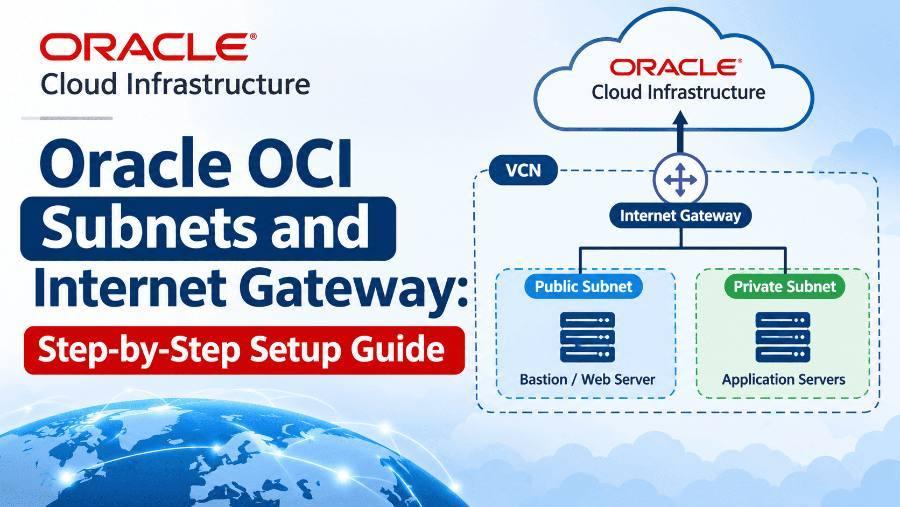
Every resource you launch in Oracle Cloud Infrastructure (OCI) needs a network to live in. A compute instance, a database or a load balancer always sits inside a subnet, and that subnet sits inside a Virtual Cloud Network (VCN).
By default, a new VCN is completely isolated. Nothing inside it can reach the internet, and nothing on the internet can reach it. To open that door, you need an Internet Gateway plus the right route and security rules.
In this lesson, you will learn what subnets and internet gateways are, how public and private subnets differ, and how to set them up step by step in the OCI Console. By the end, you will have a working public subnet with a VM you can SSH into from your laptop.
Five building blocks work together to give a subnet internet access. If any one of them is missing, traffic will not flow.
| Component | What it is | Example |
|---|---|---|
| Virtual Cloud Network (VCN) | Your private network in OCI, defined by an IP range (CIDR block) in one region | 10.0.0.0/16 |
| Subnet | A smaller slice of the VCN's IP range where resources are placed | 10.0.1.0/24 |
| Internet Gateway (IGW) | An optional virtual router that connects the VCN to the public internet | igw-demo |
| Route Table | Rules that tell traffic where to go based on destination IP | 0.0.0.0/0 → IGW |
| Security List | Virtual firewall rules (ingress and egress) applied at the subnet level | Allow TCP 22 |
A few points worth remembering:
- A VCN can have only one Internet Gateway, but many subnets can route through it.
- Subnets can be regional (spanning all availability domains in the region, recommended) or AD-specific.
- OCI reserves the first two and the last IP address of every subnet, so a /24 gives you 253 usable addresses.
- Security lists are stateful by default, so return traffic for an allowed connection is permitted automatically.
- Network Security Groups (NSGs) are an alternative that apply rules to individual VNICs instead of the whole subnet.
When you create a subnet, you choose whether it is public or private. This choice cannot be changed later, so plan it before you click Create.
| Feature | Public subnet | Private subnet |
|---|---|---|
| Public IP on instances | Allowed | Not allowed |
| Reachable from the internet | Yes, through the Internet Gateway | No |
| Outbound internet access | Internet Gateway | NAT Gateway (outbound only) |
| Access to OCI services | Internet Gateway or Service Gateway | Service Gateway |
| Typical use | Web servers, bastion hosts, load balancers | Databases, app servers, backend services |
A common, secure design is a two-tier network: a public subnet for the load balancer or bastion host, and a private subnet for the application and database servers. Only the public tier is exposed to the internet.
Before you start, make sure you have the following ready:
- An OCI account (the Always Free tier is enough for this lab)
- Permission to manage networking in a compartment, for example a policy like
Allow group NetworkAdmins to manage virtual-network-family in compartment Lab - A compartment to work in, such as
LaborTraining - An SSH key pair on your laptop, used later to test the connection
- A simple IP plan, for example VCN
10.0.0.0/16, public subnet10.0.1.0/24, private subnet10.0.2.0/24
If you don't have an SSH key yet, create one on your laptop:
ssh-keygen -t rsa -b 4096 -f ~/.ssh/oci_lab_key
We will build everything manually so you understand each piece. A faster shortcut using the VCN Wizard is covered at the end of this section.
Step 1: Create the VCN
- Log in to the OCI Console and open the navigation menu.
- Go to Networking → Virtual Cloud Networks.
- Select your compartment on the left, then click Create VCN.
- Enter a name, such as
vcn-demo. - Enter the IPv4 CIDR block
10.0.0.0/16. - Leave DNS resolution enabled and click Create VCN.
OCI automatically creates a default route table, a default security list and a default DHCP options set for the VCN.
Step 2: Create the Internet Gateway
- Open your VCN's details page.
- Under Resources, click Internet Gateways.
- Click Create Internet Gateway.
- Name it
igw-demo, choose the compartment and click Create Internet Gateway.
The gateway now exists, but no traffic uses it yet. That is the job of the route table.
Step 3: Add a Route Rule to the Internet Gateway
- In the VCN, click Route Tables and open the Default Route Table. (In production, create a separate route table for public subnets.)
- Click Add Route Rules.
- Set Target Type to Internet Gateway.
- Set Destination CIDR Block to
0.0.0.0/0, which means all internet traffic. - Choose
igw-demoas the target and click Add Route Rules.
If you prefer the command line, the same rule can be added with the OCI CLI:
oci network route-table update \
  --rt-id <route_table_ocid> \
--route-rules '[{"destination":"0.0.0.0/0","destinationType":"CIDR_BLOCK","networkEntityId":"<igw_ocid>"}]'Step 4: Review the Security List
- Click Security Lists and open the Default Security List.
- Check the ingress rules. By default, OCI allows SSH (TCP port 22) from
0.0.0.0/0and some ICMP traffic. - If you plan to host a website, click Add Ingress Rules and allow TCP ports
80and443from0.0.0.0/0. - Leave the default egress rule, which allows all outbound traffic.
0.0.0.0/0 on port 22 with your own public IP, for example 203.0.113.25/32.Step 5: Create the Public Subnet
- In the VCN, click Subnets → Create Subnet.
- Name it
public-subnet. - Choose Regional as the subnet type.
- Enter the CIDR block
10.0.1.0/24. - Select the route table that has the Internet Gateway rule.
- Under Subnet Access, choose Public Subnet.
- Select the default DHCP options and the security list you reviewed.
- Click Create Subnet.
Step 6 (Optional): Create a Private Subnet
Repeat Step 5 with the name private-subnet, CIDR 10.0.2.0/24 and Private Subnet access. Give it its own route table that points 0.0.0.0/0 to a NAT Gateway, not the Internet Gateway, so instances can download updates without being exposed.
Shortcut: The VCN Wizard
On the Virtual Cloud Networks page, click Start VCN Wizard and choose Create VCN with Internet Connectivity. In one go, it creates a VCN, a public subnet, a private subnet, an Internet Gateway, a NAT Gateway, a Service Gateway, and the matching route tables and security lists. Use it for speed once you understand the manual steps.
Launch a small VM in the public subnet to confirm everything works.
- Go to Compute → Instances → Create Instance.
- Pick an Always Free shape and an Oracle Linux or Ubuntu image.
- Under Networking, select
vcn-demoandpublic-subnet, and make sure Assign a public IPv4 address is on. - Upload or paste your SSH public key, then click Create.
- When the instance is running, copy its public IP and connect from your laptop.
ssh -i ~/.ssh/oci_lab_key opc@<public-ip>
Use ubuntu instead of opc for Ubuntu images. Once logged in, check outbound internet access:
ping -c 3 oracle.com
curl -I https://www.oracle.com
| Symptom | Likely cause | Fix |
|---|---|---|
| SSH times out | No route rule to the Internet Gateway | Add 0.0.0.0/0 → igw-demo to the subnet's route table |
| SSH times out | Port 22 not allowed | Add an ingress rule for TCP 22 in the security list or NSG |
| No public IP option | Subnet was created as private | Create a new public subnet; access type cannot be changed |
| Rules look right but nothing works | Subnet uses a different route table | Edit the subnet and select the correct route table |
| Website not loading | Ports 80/443 blocked in OCI or the OS firewall | Add ingress rules and open the ports on the VM |
The last one catches many beginners. Oracle Linux images have their own host firewall, so you must open ports both in Oracle OCI and inside the instance:
sudo firewall-cmd --permanent --add-service=http
sudo firewall-cmd --permanent --add-service=https
sudo firewall-cmd --reload
- Plan your CIDR ranges first. Avoid overlaps with on-premises networks or other VCNs you may peer with later.
- Use regional subnets. They survive the loss of a single availability domain and are easier to manage.
- Keep backends private. Put databases and app servers in private subnets and reach them through a bastion host or the OCI Bastion service.
- Separate route tables. Give public and private subnets their own route tables instead of editing the default one.
- Restrict SSH. Never leave port 22 open to
0.0.0.0/0in production; allow only trusted IPs. - Prefer NSGs for fine control. Use Network Security Groups when instances in the same subnet need different rules.
- Use a Service Gateway for Object Storage and other Oracle services, so that traffic stays on Oracle's network.
Can a VCN have more than one Internet Gateway?
No. Each VCN supports only one Internet Gateway, but many subnets can route through it.
Can I convert a private subnet into a public subnet?
No. The access type is fixed at creation. Create a new subnet with the access type you need.
What is the difference between an Internet Gateway and a NAT Gateway?
An Internet Gateway allows traffic in both directions for resources with public IPs. A NAT Gateway allows only outbound connections from private resources.
Is the Internet Gateway charged?
The gateway itself has no separate fee. Outbound data transfer is billed according to OCI pricing, which includes a monthly free allowance.
Is this topic part of OCI certification exams?
Yes. VCNs, subnets, gateways, route tables and security lists are core topics in the OCI Foundations and OCI Architect Associate exams.
An Internet Gateway opens a VCN to the internet, but only when three things line up: a public subnet, a route rule sending 0.0.0.0/0 to the gateway, and a security rule that allows the traffic. Miss any one, and the connection fails.
Practise this lab a few times, then try the VCN Wizard and compare what it builds. In the next lesson, we will look at NAT Gateways and Service Gateways to secure private subnets.
[Author name], [Role] at KP Expert. [Add real experience here: years working with Oracle Cloud Infrastructure, OCI certifications held, and how many learners you've trained.] Connect on [LinkedIn profile link].
Reviewed by: [Reviewer name, title], [date].
Recap: what to take away
- Every OCI resource sits in a subnet inside a VCN, which is isolated by default
- An Internet Gateway connects the VCN to the internet; only one is allowed per VCN
- Internet access needs a public subnet, a 0.0.0.0/0 route rule and a matching security rule
- Public vs private access is fixed when the subnet is created
- Keep databases and app servers in private subnets behind a NAT Gateway
Want to master OCI hands-on? KP Expert's live Oracle Cloud training covers networking, compute, security and certification prep with real lab scenarios. Explore KP Expert courses.