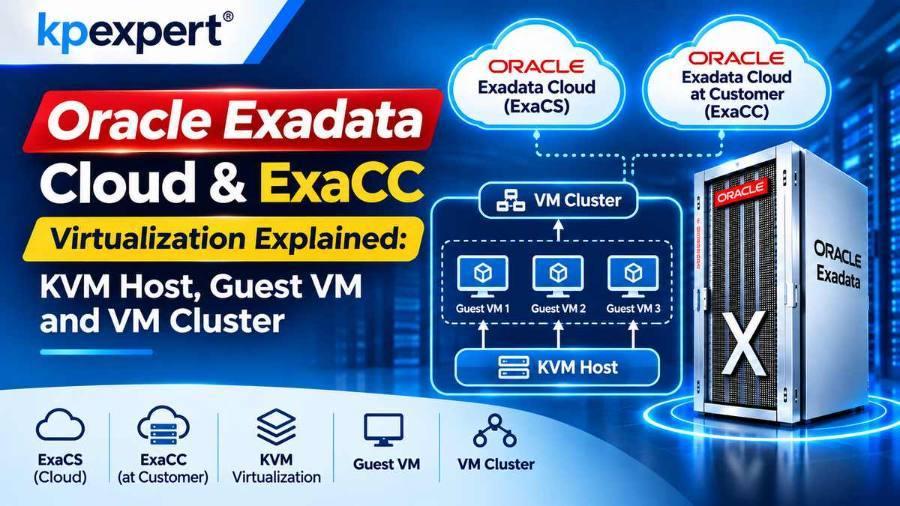
When you move from an on-premises Exadata to Exadata in the cloud, one of the first things you notice is that you never log in to the physical database server. Oracle's documentation explains why: each Exadata database server contains one or more virtual machine (VM) guests running on a hypervisor, and this design creates a clear separation between Oracle-managed and customer-managed components.
To work confidently on ExaDB-D or ExaCC, you need to understand three layers: the KVM host, the guest VM and the VM cluster. This guide explains each of them using Oracle's official documentation.
1. Why Exadata Uses KVM
Starting with Oracle Exadata X8M-2, Oracle Linux KVM is the virtualization technology for systems that use RoCE Network Fabric. According to Oracle's Exadata KVM overview, KVM is supported only on RoCE-based systems (X11M, X10M, X9M-2 and X8M-2). Virtualization is not supported on 8-socket database servers such as X8M-8 and X9M-8.
Older Exadata generations used Xen. The same overview notes that KVM works only with RoCE interconnects and Xen works only with InfiniBand, so X8 and earlier systems stay on Xen. Moving from Xen to KVM is done through database migration methods such as Data Guard, GoldenGate, RMAN or Zero Downtime Migration (ZDM).
The same change happened in the cloud. Oracle's Exadata Cloud Service X8M data sheet describes X8M as bringing a faster 100 Gbps RoCE internal network fabric and improved virtualization based on Kernel-based Virtual Machine (KVM). The difference still shows up in daily work on ExaCC: Oracle documents that on X8M and later, resizing guest VM file systems is an online operation, while X8 systems on the Xen-based hypervisor still need a rolling restart of the guest VM.
2. The KVM Host: Oracle's Layer
The KVM host is the physical database server running the hypervisor. In Exadata cloud services, Oracle manages the hypervisors through the management network, which connects the database server and storage server hardware. Oracle's ExaCC service description states that customers have no administrative access to the physical database server hardware, which Oracle administers.
Resources reserved by the host
- ExaDB-D: Oracle states that each hypervisor uses only 2 CPU cores (OCPUs) and 16 GB of RAM.
- Exadata KVM in general: the host is allocated 4 vCPUs (2 cores) that are not available to guests. It also reserves memory for scheduling, networking, storage I/O and administration.
- Memory rule: the memory of all KVM guests plus the host's reserved memory must not exceed installed physical memory. Memory cannot be over-provisioned.
Why host maintenance is rolling
The KVM overview points out that rebooting a KVM host requires restarting all the VMs on it. That is why Oracle's infrastructure maintenance is rolling by default. On Exadata cloud infrastructure, Oracle applies updates quarterly, typically in January, April, July and October, and may also apply time-sensitive security patches between those cycles. By default, maintenance updates the database server hosts in a rolling fashion and then the storage servers. You can choose non-rolling maintenance instead, which is shorter but incurs full system downtime.
3. The Guest VM: Your Layer
The guest VM (called domU in some Oracle documentation) is where your work as a DBA happens. On ExaCC you have root privilege on the database server VMs, so you can manage Oracle Database, Oracle Grid Infrastructure and Oracle Exadata system software. Oracle's ExaDB-D architecture page states that each VM guest has a complete Oracle Database installation, including Enterprise Edition options such as RAC, plus Oracle Grid Infrastructure.
Guest VM networking and storage access
- The client and backup networks connect to the VM guests through bonded interfaces:
bondeth0for the client network andbondeth1for the backup network. - There is no direct access from Oracle's management network to your client and backup networks.
- VMs reach the Exadata storage servers through a private, non-routed interconnect network with SR-IOV mapped interfaces.
Guest VM local file systems
On ExaCC, /u02 is the only file system you can shrink; the others can only grow. The maximum supported size of any file system is 900 GB. On KVM hosts, scaling up /u02 does not require downtime, because increasing LVM volumes is an online operation.
Your patching responsibilities
Oracle's ExaCC patching documentation lists two regular customer tasks: patching Grid Infrastructure and Database software on the VM cluster VMs, and updating the operating system on those VMs. Both can be done from the OCI Console or API, or manually with the dbaascli utility. Oracle also lets you choose between an Oracle Linux 7 and an Oracle Linux 8 based guest image when you provision a VM cluster.
4. The VM Cluster: Where RAC Lives
Oracle's KVM overview defines a VM cluster as one or more guests on different database servers running Oracle Grid Infrastructure/RAC, each accessing the same shared Exadata storage. The ExaCC documentation describes the VM cluster as the link between your Exadata infrastructure and the Oracle Databases you deploy, and notes that it contains an Oracle Clusterware installation.
Isolation between VM clusters
- Each VM cluster has its own OS users, VM size, Grid Infrastructure version, database versions and networking.
- Each VM cluster has its own grid disks and disk groups and/or Exascale vaults. On ExaCC, Oracle states that each ASM VM cluster has its own pool of Exadata storage.
- With Secure RDMA Fabric Isolation, VM clusters cannot communicate with each other, while all VMs can still reach shared storage.
ExaDB-D resource model
On ExaDB-D, you provision two resources separately. The cloud Exadata infrastructure resource is the top-level (parent) resource. The cloud VM cluster is its child, and networking, OCPU count, IORM and Oracle Grid Infrastructure are configured and managed at the VM cluster level. The older DB system resource model is deprecated for Exadata Cloud Infrastructure.
ExaCC provisioning flow
On ExaCC, you must have an available, validated VM cluster network before you can create a VM cluster. Each VM cluster network is pre-provisioned with IP addresses for every DB server, and one cluster network can be used by only one VM cluster. With VM Cluster Node Subsetting, you can place a VM cluster on a subset of database servers. A cluster needs a minimum of one VM, but Oracle recommends at least two for high availability. Every VM in a cluster gets the same resource allocation.
VM cluster limits
- ExaCC X11M: a maximum of 12 VM clusters on a system with 2 database servers, and 24 on a system with more than 2 database servers.
- ExaDB-D: Oracle's technical architecture page states that you can host up to eight VM clusters across all the database servers.
- Per database server (Exadata KVM): up to 50 KVM guests on X11M and X10M with Exadata 24.1 or later; 12 on X10M with 23.1, X9M and X8M.
Scaling a VM cluster on ExaCC
- You can scale memory, local disk (
/u02), ASM storage and CPUs (ECPUs on X11M) up or down. - Scaling memory requires a rolling restart of the database servers and changes the HugePages settings.
- Resizing ASM disk groups triggers an ASM rebalance, which may temporarily affect performance.
- Billing does not stop when a VM cluster is stopped. To stop billing, reduce the OCPU (or ECPU) count to zero. Even then, the hypervisor reserves a minimum of 2 OCPUs (8 ECPUs on X11M) for each VM.
Exascale VM clusters
ExaCC also supports Exascale VM clusters. They need X8M or later infrastructure, Exadata System Software 24.1 or later and Grid Infrastructure 26ai, and only Oracle Database 26ai can be provisioned on them. VM clusters that use ASM for databases can also use Exascale for VM storage.
5. Who Manages What
| Component | Managed by |
|---|---|
| Database server hardware and KVM hypervisor | Oracle |
| Exadata storage server hardware and software | Oracle |
| Network switches, PDUs, ILOM | Oracle |
| Quarterly infrastructure maintenance | Oracle (you control scheduling preferences) |
| Guest VM OS updates | Customer |
| Grid Infrastructure and Database patching | Customer |
| ASM disk groups, databases, client and backup subnets | Customer |
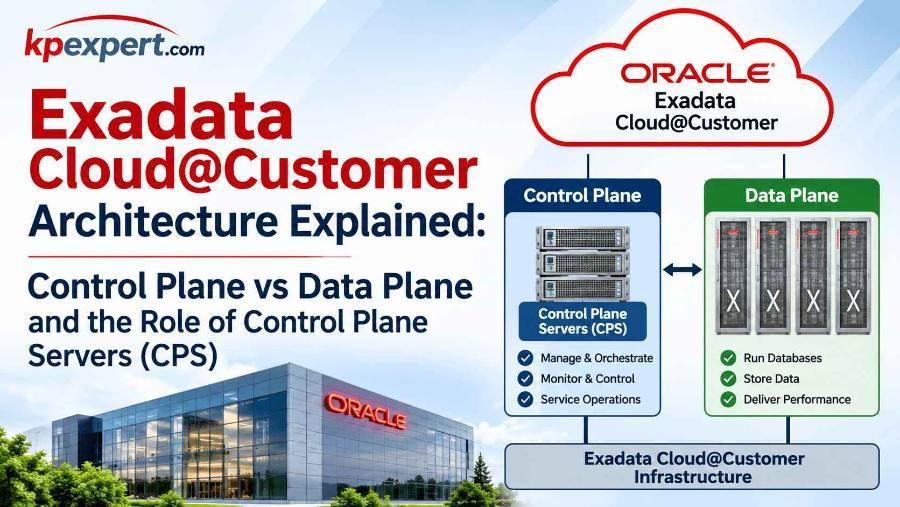
On ExaCC, the infrastructure also includes two Control Plane Servers (CPS). They connect to an OCI region through an outgoing, persistent, secure tunnel and deliver cloud automation commands to your VM clusters. You can also control SSH access by Oracle operators through Operator Access Control.
6. Key Takeaways for DBAs
- KVM is the hypervisor on X8M-2 and later RoCE-based Exadata. X8 and earlier use Xen.
- The KVM host belongs to Oracle; the guest VM and everything inside it belong to you.
- A VM cluster is a set of guest VMs on different DB servers running Grid Infrastructure/RAC over shared Exadata storage, isolated from other VM clusters.
- Plan memory changes for a rolling restart. Grow
/u02online on KVM. - Infrastructure maintenance is quarterly and rolling by default. Guest OS, Grid Infrastructure and database patching are your responsibility.
Want hands-on Exadata skills?
Learn Exadata architecture, administration and cloud operations with real-world guidance in KP Expert's Oracle Exadata course.
Explore the Oracle Exadata Course