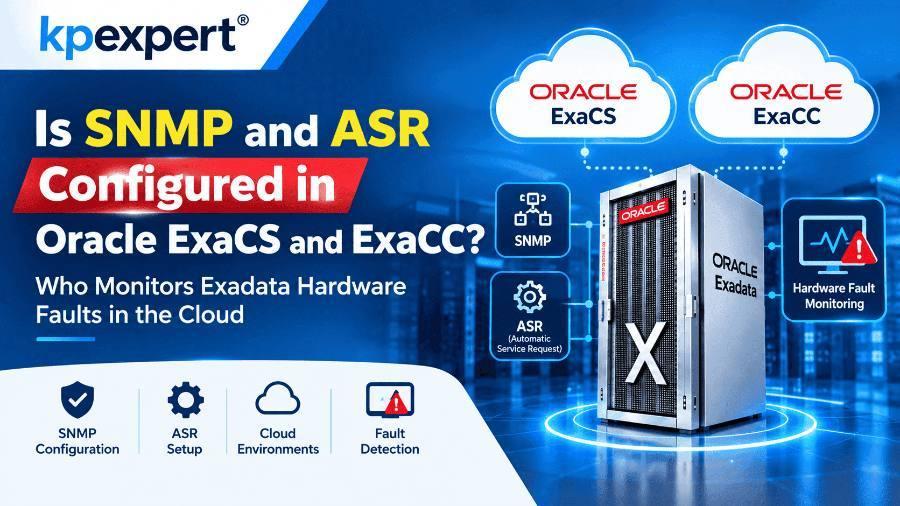
Who configures ASR and SNMP on Exadata Cloud Service and Exadata Cloud@Customer, how Oracle detects and fixes hardware faults, and which monitoring tools you still own.
Updated 20 November 2026 by KP Expert · 8 min read
Quick summary
ExaCS and ExaCC customers do not configure ASR or SNMP traps. Oracle monitors Exadata hardware faults, handles replacements, and coordinates through maintenance contacts. This guide compares on-premises, ExaCS and ExaCC responsibilities and explains the customer tools you can still use: OCI Events, Monitoring, Database Management, Enterprise Manager, ExaCLI and AHF.
Key takeaways
- You don't install ASR Manager for ExaCS or ExaCC.
- Oracle owns hardware-fault monitoring and part replacement.
- You have no direct access to infrastructure; ExaCLI gives limited storage-server access.
- Subscribe to infrastructure events and keep contacts current.
- Keep TFA, AHF and CRS healthy so events leave your VMs.
In this guide
01Introduction
Short answer: on Oracle Exadata Database Service on Dedicated Infrastructure (ExaCS) and on Exadata Cloud@Customer (ExaCC), you do not set up ASR or SNMP traps. Oracle monitors the hardware and handles faults as part of the service.
DBAs moving from on-premises Exadata often ask this first. On-premises, the customer installs Oracle ASR Manager and points every server's SNMP traps at it. In the cloud, that layer belongs to Oracle. This post explains who owns what, how Oracle watches the hardware, and which tools you, the customer, should still use.
02Quick Recap: ASR and SNMP on On-Premises Exadata
On-premises, ASR works only after you configure the Exadata components to send hardware fault telemetry to Oracle ASR Manager. Oracle describes ASR as software that customers install themselves. Its value is that common hardware failures open a support case automatically, so you don't have to call Oracle Support.
The trap destination is set per server with the snmpSubscriber attribute:
Setting type=ASR or type=v3ASR points both the storage server and its ILOM at ASR Manager. Removing those entries turns off ASR traps for that server. Email and SNMP alert delivery is controlled by notificationMethod (for example snmp,mail) and notificationPolicy (for example Critical,Warning,Clear).
When hardware fails on-premises, your team receives the alert, checks that ASR opened a service request, and lets Oracle's field engineer into the data center to replace the part.
03The Shared Responsibility Model
In both cloud versions, Oracle owns the physical infrastructure and you own the VMs and databases.
| Service | Oracle manages | Customer manages |
|---|---|---|
| ExaCS | Physical database servers, storage servers, storage network switches, out-of-band management switches, PDUs, data center security | Guest VMs and the database services in them |
| ExaCC | Physical database and storage servers, internal network switches, PDUs, the OCI region that runs the service | OCI tenancy, VMs, databases on those VMs |
For software, Oracle maintains the base OS and hardware. You maintain the guest VM OS, Grid Infrastructure and database software. Oracle manages the infrastructure over a separate management network that connects the database and storage server hardware.
04So, Are SNMP and ASR Configured?
You don't configure them, and you don't need to. Hardware fault monitoring is Oracle's job in both services.
ExaCS
Oracle Cloud Ops monitors hardware faults, availability and capacity. The customer's platform-monitoring entry is "nothing required".
ExaCC
Oracle owns hardware-fault monitoring, plus event monitoring and maintenance for ASR-qualified products.
Oracle's ExaCS and ExaCC documentation never mentions SNMP. So the honest wording is that the ASR and SNMP layer you knew on-premises is Oracle-managed and hidden from you. Don't plan to point traps at your own ASR Manager.
cloud_user_<clustername> can run commands such as LIST GRIDDISK from a VM.05How Oracle Monitors the Hardware
Oracle does not publish its internal fault-detection process step by step. What its documentation does describe is this:
- Control Plane Servers (ExaCC): each ExaCC rack has two Control Plane Servers that connect it to OCI. The VPN they use carries your console and API operations. It also carries Oracle's monitoring and administration of the infrastructure it manages.
- Infrastructure metrics: on ExaCC, Oracle sends infrastructure monitoring metrics to an OCI Monitoring Service endpoint.
- Automation first: Oracle says most issues are fixed by automation. Human operators get access only when automation can't solve the problem.
- Exadata's own software: the Management Server (MS) is part of the Exadata image and manages and monitors image functions. ExaWatcher collects and archives system statistics on database and storage servers. It is a data collector, not a fault alarm.
On ExaCC, Oracle's summary is simply that it monitors and responds to issues within its area of responsibility.
06What Happens When a Part Fails
When a disk fails, the Exadata software protects your data first, and then Oracle handles the replacement.
- Exadata reacts automatically. If a hard disk enters predictive failure, Exadata System Software starts an ASM rebalance to move data off that disk. For flash disks, the software tracks the rebalance and cache flush and reports when the disk can be replaced safely.
- You may see an event. On ExaCS, the information event
HEALTH.INFRASTRUCTURE.CELL.FLASH_DISK_FAILUREtells you a flash disk failure was detected. It says the Oracle Exadata team is investigating, the disk will be replaced if needed, and you don't need to act. - Oracle coordinates through your contacts. On ExaCC, maintenance contacts are required for service-request-based communication about hardware replacement. The primary contact's phone number is used to arrange on-site visits for hardware maintenance.
- Oracle supplies the parts and the engineer. Oracle's ExaCC responsibilities include spare parts, field dispatch and on-site diagnostic help. On ExaCS, spare parts and field dispatch sit with Oracle Cloud Ops.
Your part on ExaCC
Keep the maintenance contact details current and let Oracle's engineer into your data center.
07Tools You Can Use for Monitoring
You can't watch the hardware the way you did on-premises, but you can watch its effects and Oracle's notices.
| Tool | What it gives you |
|---|---|
| OCI Events + Notifications | ExaCS infrastructure emits critical events (needs urgent attention) and information events. You subscribe to them through the Notifications service. |
| OCI Monitoring | Health, capacity and performance metrics for VM clusters and databases, with alarms and notifications |
| OCI Database Management | Monitors the storage servers of Exadata infrastructure on-premises, on ExaDB-D (ExaCS) and on ExaDB-C@C (ExaCC) |
| Oracle Enterprise Manager | Oracle's recommended tool to manage and monitor ExaCS and ExaCC resources, through an Exadata Cloud target |
| ExaCLI | Monitoring and management commands on the storage servers, run from your VM |
| AHF (TFA + exachk) | Diagnostics and health checks inside your VMs. TFA must be running for events to leave the VM cluster, and AHF 22.2.2 or later is required. |
Event subscriptions can deliver by email, functions, streams and other channels. For exachk, MOS note 1070954.1 states that customers run exachk in their VM clusters, while Oracle Cloud Operations runs it on the infrastructure Oracle manages. Check the note on My Oracle Support for the current wording.
08On-Premises vs ExaCS vs ExaCC
| Question | On-premises Exadata | ExaCS | ExaCC |
|---|---|---|---|
| Who sets up ASR and SNMP traps | Customer | Oracle-managed; not exposed to you | Oracle-managed; not exposed to you |
| Who monitors hardware faults | Customer, with ASR | Oracle Cloud Ops | Oracle |
| Customer access to storage servers | Full (CellCLI) | Limited, via ExaCLI | No direct access to infrastructure |
| Who replaces failed parts | Oracle field engineer, after the ASR service request | Oracle | Oracle, on-site in your data center |
| Where you get told | ASR service request and email alerts | OCI Events and Notifications | Maintenance contacts and OCI Events |
Note: ExaCLI access is documented for ExaCS. Check with Oracle whether the same access applies to your ExaCC environment.
09Best Practices
✓ Do
- Keep ExaCC maintenance contacts current: one primary and up to nine secondary contacts, all notified about hardware replacement, network issues and maintenance.
- Create the "Data Center Access" MOS user group first; MOS note KB182930 explains it.
- Use both routes: email to maintenance contacts and subscriptions to maintenance events.
- Route critical infrastructure events to a topic your on-call team watches.
✗ Avoid
- Letting CRS start after AHF: if CRS isn't running before AHF starts, no metrics, events or audit events are sent.
- Blocking egress on ExaCS: events and metrics need outbound HTTPS on port 443 to Oracle Services Network, through a public IP or service gateway.
- Planning to point SNMP traps at your own ASR Manager.
- Leaving the primary contact out of date, so Oracle can't arrange an on-site visit.
10Frequently Asked Questions
QDo I need to install ASR Manager for ExaCS or ExaCC?
No. Hardware fault monitoring is Oracle's responsibility in both services.
QCan I log in to ILOM or the storage cells as root?
No. On ExaCC you can't access infrastructure components directly. On ExaCS you can query the storage servers through ExaCLI as cloud_user_<clustername>.
QA flash disk failed on my ExaCS. What do I do?
Nothing, according to Oracle's event text. Oracle investigates and replaces the disk if needed.
QHow does ExaCC talk to Oracle if it sits in my data center?
Through two Control Plane Servers in the rack that connect to an OCI region.
QWhy am I not getting events or metrics from my VM cluster?
Check that TFA is running on AHF 22.2.2 or later, that egress on port 443 is open, and that CRS was up before AHF started.
QWho replaces a failed part on ExaCC?
Oracle. Spare parts and field dispatch are Oracle's responsibility, and Oracle uses your contact's phone number to arrange the on-site visit.
11Conclusion
On ExaCS and ExaCC, the ASR and SNMP work you did on-premises moves to Oracle. Oracle monitors hardware faults, supplies parts and sends engineers. Your job shifts to the layer you own: subscribe to events, watch VM and database metrics, keep TFA, AHF and CRS healthy, and keep your maintenance contacts up to date.
About the author
KP Expert Oracle Exadata Training Team. Our trainers teach Oracle Exadata administration across on-premises, ExaCS and ExaCC, including hardware diagnostics and cloud monitoring, in live, hands-on classes for DBAs and Database Machine Administrators. Learn more at KP Expert's Oracle Exadata course.
Last reviewed: 20 November 2026.
Learn Exadata hands-on
Want to go deeper into Exadata administration across on-premises, ExaCS and ExaCC? Join KP Expert's live Oracle Exadata course.
Explore the Oracle Exadata courseBook a free demo class